

Team Hub
Manage team membership, seats, invitations, roles, approvals, activity, security policy, and workspace access health from one administrator workspace.
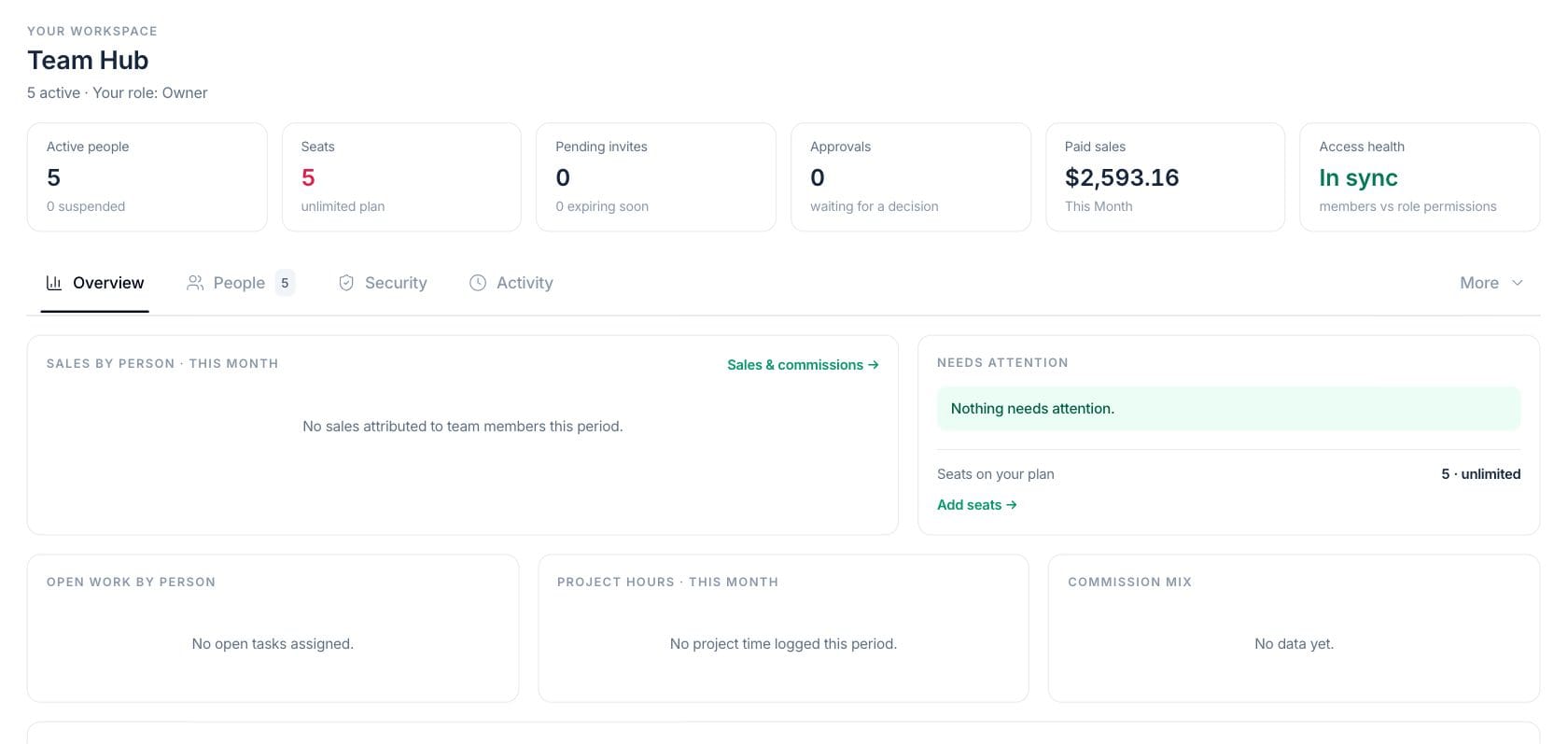
At a glance
The numbers on your screen, explained
What each Team Hub number means and where it comes from — so you know where to act.
Counts active workspace members and shows suspended members in the hint.
Shows seats used compared with the plan limit when a limit applies.
Counts pending invitations and highlights those close to expiration.
Shows whether member access is aligned with their role permissions.
Sample numbers from a demo workspace.
People
Control membership, roles, invitations, and seats
Team Hub brings active people, seat usage, pending invites, approvals, sales visibility, and access health together for owners and admins.
- People and invitation tabs
- Seat usage and add-seat actions
- Role management
- Approval and activity tabs
Security
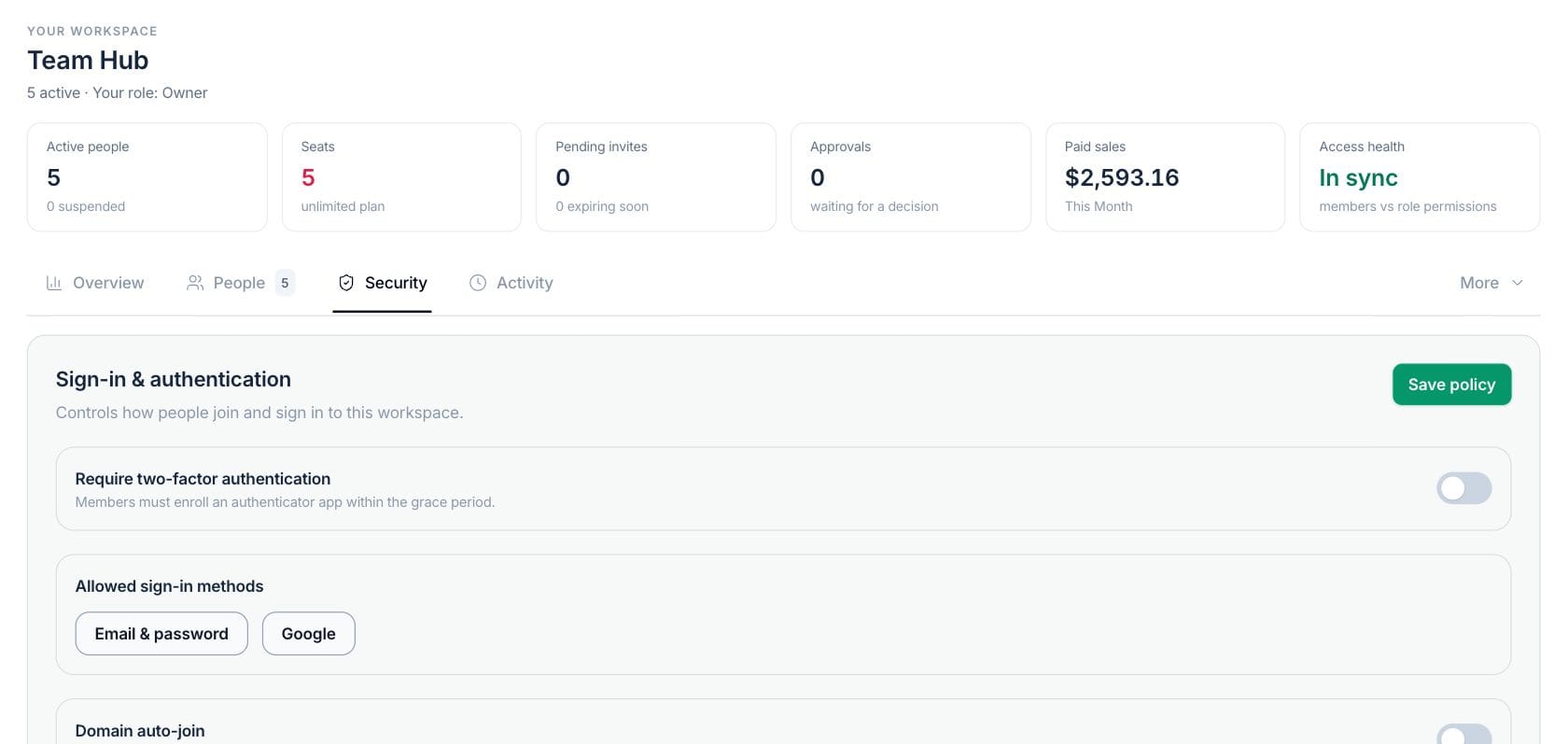
Set sign-in rules for the workspace
Admins can require two-factor authentication, choose allowed sign-in methods, and configure domain auto-join behavior for verified company email domains.
- Require two-factor authentication
- Email/password and Google sign-in methods
- Domain auto-join controls
- Save policy action
Access
Approve access requests and protect ownership
Team Hub supports domain join requests, member suspension, workload reassignment, ownership transfer, and role-aware access review.
- Access requests tab
- Suspend member protection
- Member workload reassignment
- Ownership transfer flow
Everything included
Everything in Team Hub
Use it for team coordination, handoffs, operational notices, and shared priorities.
Member management
Review people, roles, status, workload context, and member profile details.
Invitations
Invite team members and track pending or expiring invitations.
2FA policy
Require authenticator enrollment and review security policy from Team Hub.
Allowed sign-in methods
Choose whether members can use email and password, Google sign-in, or both.
Domain auto-join
Let verified company-domain users request or join the workspace based on policy.
Seats
See used seats, remaining seats, and seat-limit pressure.
Workload reassignment
Reassign tasks, CRM work, clients, projects, and approvals during member changes.
Ownership transfer
Use a protected ownership transfer flow when the workspace owner changes.
How it works
Team Hub, step by step
- 01
Invite or approve people
Send invitations or review domain access requests from the workspace.
- 02
Assign roles and seats
Set roles, check seat capacity, and keep access aligned with responsibility.
- 03
Set security policy
Choose 2FA, allowed sign-in methods, and domain join rules.
- 04
Review ongoing health
Use access health, activity, approvals, and member workload views during team administration.
Connected
Works with the rest of Fratelli
The same records flow between these workspaces automatically.
FAQ
Team Hub questions
Can’t find what you need? Our team is happy to help.
Yes. Team Hub security policy supports domain auto-join settings, including whether requests require approval.
Yes. Ownership transfer is supported through a protected flow that requires recent owner authentication and an emailed acceptance link.
Yes. The team governance flow marks access suspended and revokes refresh tokens for the suspended member.
Try Team Hub with the rest of Fratelli
Start free in minutes and bring the rest of your team when you are ready.