

Customer Orders
Let customers browse a branded portal and place orders while your team manages approvals, fulfillment, payment issues, and invoice handoff internally.
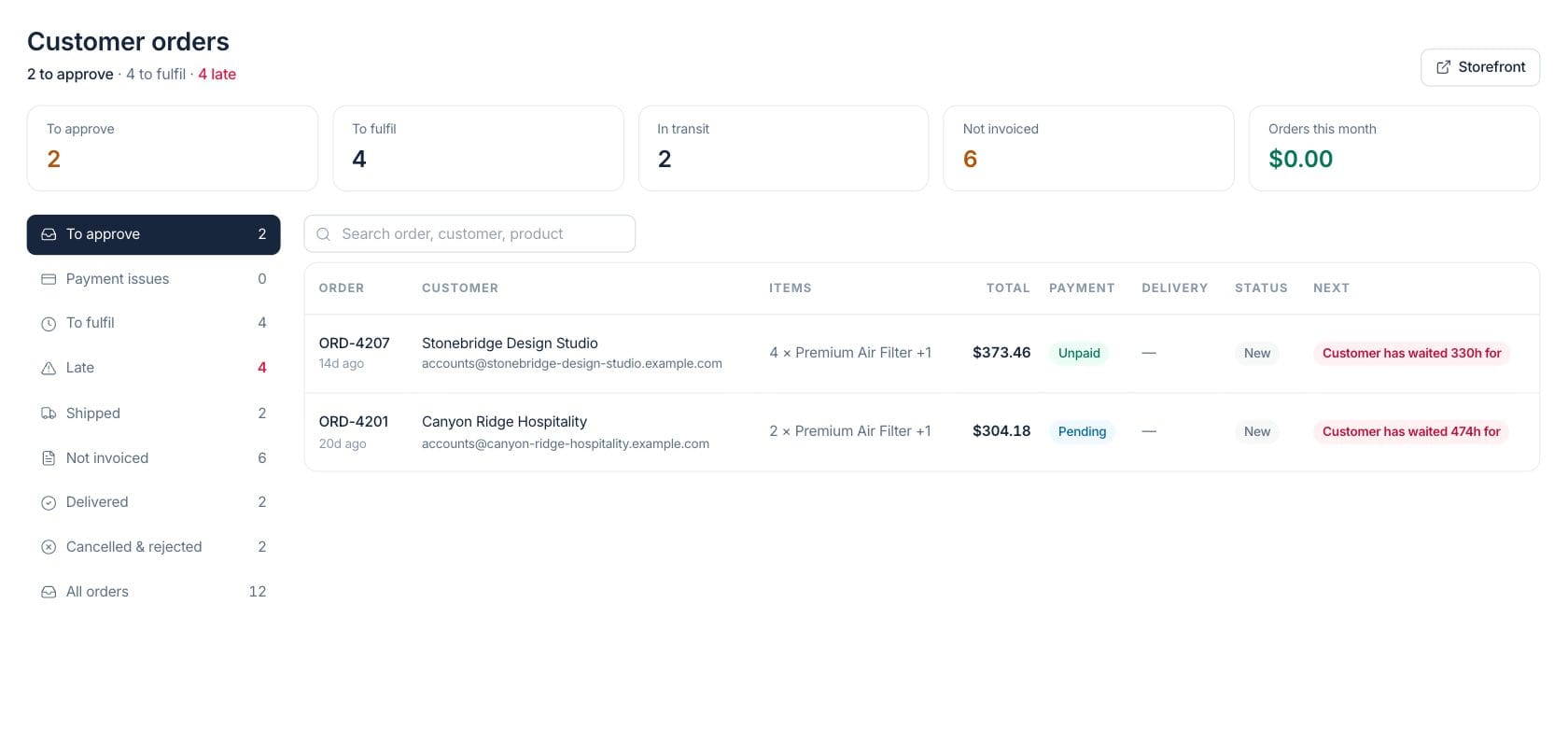
At a glance
The numbers on your screen, explained
What each Customer Orders number means and where it comes from — so you know where to act.
Portal orders submitted by customers that are still waiting for team approval.
Approved or processing customer orders that still need fulfillment work.
Confirmed, processing, shipped, or delivered orders that do not yet have an invoice.
The value of non-cancelled portal orders created during the current month.
Sample numbers from a demo workspace.
Order ops
Manage the portal orders customers submit
The internal customer orders screen separates approval, payment issues, fulfillment, late orders, shipped orders, delivered orders, and uninvoiced work so the team can keep customer orders moving.
- Approval, payment, fulfillment, late, shipped, delivered, and closed views
- Order table with items, total, payment, delivery, status, and next signal
- Late and waiting-time alerts
- Storefront shortcut from the workspace
Storefront
A storefront that looks like your brand
Start with a ready-made customer website template. Showcase your products with rich imagery, guide shoppers to your collection, and connect browsing to your catalog and orders — all under your own domain.
- Product photography and branded layouts
- Collection pages that lead into your catalog
- Connected shopping cart and customer orders
- Your brand, your colours, your domain

Catalog
Show products with categories, search, and prices
The customer-facing catalog lets shoppers browse configured products by category, search by product details, and view prices before placing an order.
- Product search
- Category filters
- Grid and product cards
- Product names, images, and prices
Billing handoff
Turn delivered orders into invoices when payment is not settled
When portal orders are delivered or shipped but not invoiced, the internal queue flags them so staff can create the invoice and keep the customer record complete.
- Not invoiced KPI and view
- Create invoice action from order detail
- Payment status visible on each order
- Customer order history remains linked to the customer
Everything included
Everything in Customer Orders
Use it for repeat ordering, account-specific catalogs, and order-status visibility.
Branded portal home
Customers start from a public portal landing page with business branding and ordering entry points.
Product catalog
Portal shoppers can browse product cards, prices, images, categories, and search results.
Approval queue
New customer orders are grouped for team review before fulfillment continues.
Payment issue view
Orders with failed or waiting payment states can be reviewed separately.
Fulfillment tracking
Fulfillment, shipped, late, and delivered views keep operational work visible.
Invoice handoff
Orders that are not invoiced are called out so billing can be completed.
Waiting-time signals
The order list highlights customers who have waited too long for approval or delivery.
Customer history
Portal orders connect back to customer records and order history.
How it works
Customer Orders, step by step
- 01
Publish the portal experience
Customers use the branded portal home and catalog to browse products and begin orders.
- 02
Review submitted orders
The team watches To approve, payment issues, and fulfillment views in the internal order workspace.
- 03
Fulfill and update status
Staff move orders through approved, processing, shipped, and delivered states with delivery and tracking context.
- 04
Complete billing
Use the not-invoiced view and order detail actions to create invoices when an order still needs billing.
Connected
Works with the rest of Fratelli
The same records flow between these workspaces automatically.
FAQ
Customer Orders questions
Can’t find what you need? Our team is happy to help.
No. This product page focuses on customer order operations and the public portal shoppers use to browse products and place orders. The website builder is part of the broader Customer Portal area.
Yes. New portal orders appear in a To approve view before they move into fulfillment work.
The workspace flags orders that are not invoiced and provides invoice handoff actions, so staff can complete billing from the order context.
Try Customer Orders with the rest of Fratelli
Start free in minutes and bring the rest of your team when you are ready.