

Cash & Bank
See every bank balance, card balance, cash movement and unmatched line in one workspace built for daily finance review.
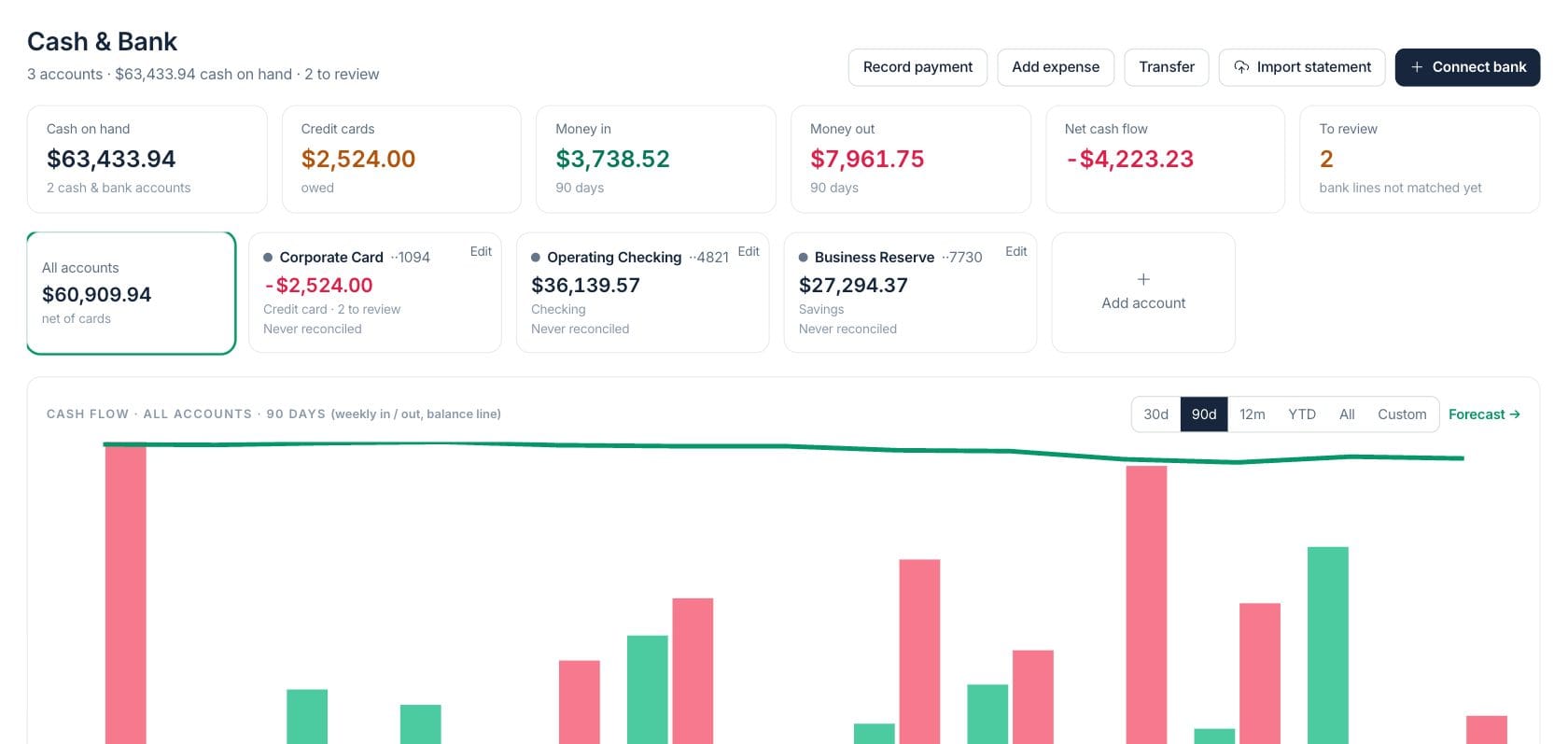
At a glance
The numbers on your screen, explained
What each Cash & Bank number means and where it comes from — so you know where to act.
The total balance across active cash and bank accounts, excluding credit-card debt.
Incoming bank activity for the selected period, or recorded customer payments when no bank account is connected.
Outgoing bank activity for the selected period, including expenses, card payments, transfers and other withdrawals.
Bank lines still need a match, category, exclusion or transfer decision before the books are clean.
Sample numbers from a demo workspace.
Balances
Know the cash position before decisions are made
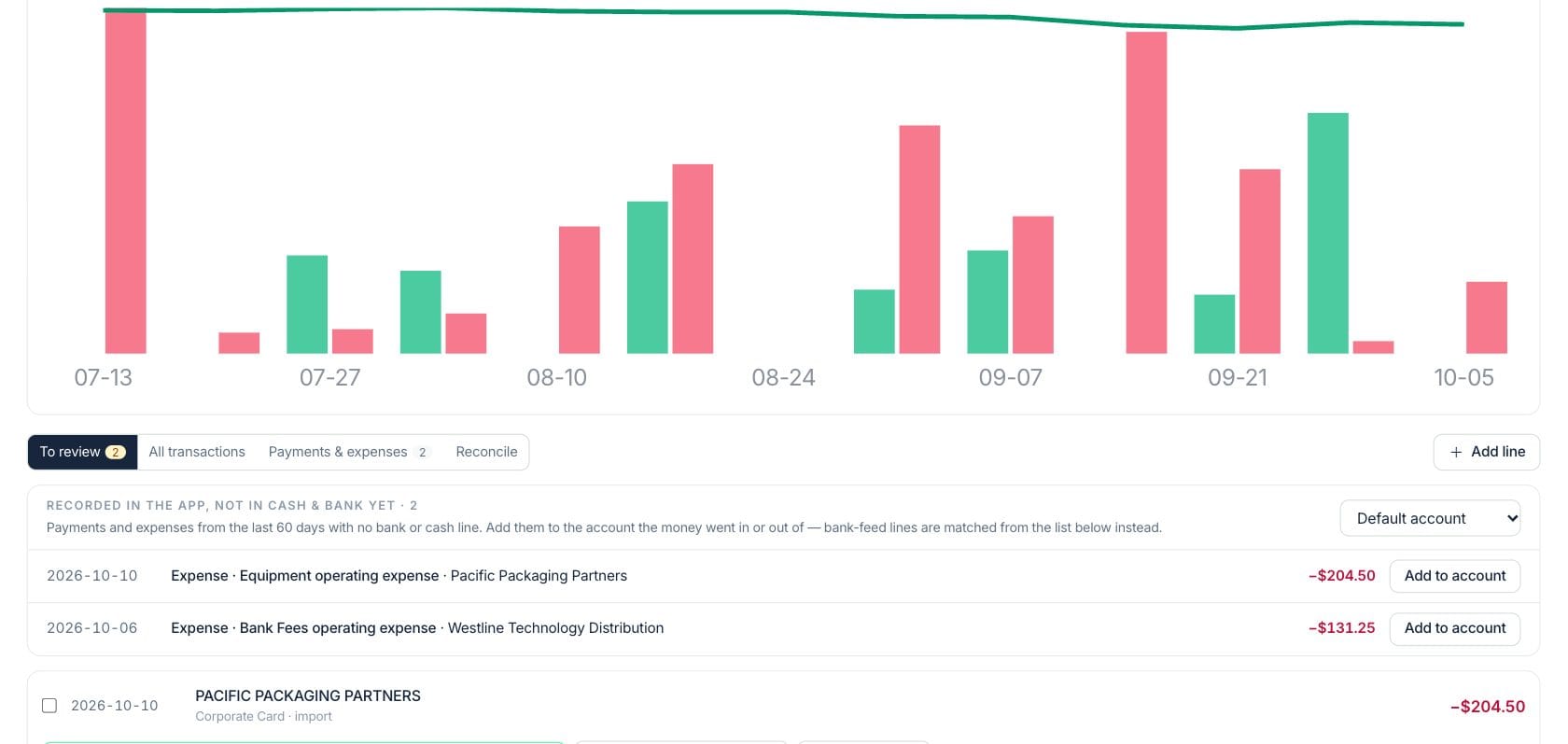
Cash & Bank shows operating accounts, reserve accounts and credit cards together, with cash in, cash out and net flow for the selected period.
- Filter by 30 days, 90 days, year to date or custom dates
- Separate cash accounts from credit-card balances
- See weekly money in, money out and balance movement
Review
Match bank lines to the records that explain them
Imported or connected transactions can be matched to invoice payments, expenses, checks, Stripe payouts or transfers so finance keeps one operating record.
- Review unmatched bank lines from one queue
- Categorize, exclude or match lines in bulk
- Create an expense or recorded payment from a bank line
Import
Use live feeds when available, or import statements
Teams can connect bank feeds through Plaid or import CSV, OFX and QFX statements with column mapping and duplicate detection.
- Connect bank accounts when bank feeds are enabled
- Map statement columns during import
- Skip lines that were already imported
Everything included
Everything in Cash & Bank
Use it for cash reviews, transaction follow-up, and bank activity oversight.
Cash and card balances
Track checking, savings, cash, reserve and credit-card accounts in the same review workspace.
Bank feed sync
Bring balances and transactions from connected Plaid bank feeds when the integration is configured.
Statement import
Import CSV, OFX or QFX statements, map columns and avoid re-importing duplicate bank lines.
Source matching
Match bank lines to invoice payments, expenses, checks, payouts and transfers.
Cash flow chart
Review money in, money out and the balance line across the selected period.
Fast expense entry
Add an expense from a withdrawal without leaving the cash review workflow.
Review queue
See which lines still need matching, categorization or exclusion before reconciliation.
How it works
Cash & Bank, step by step
- 01
Connect or add accounts
Start with live bank feeds where available, or create manual cash, bank and credit-card accounts with opening balances.
- 02
Review new activity
Work through unmatched lines, using suggested matches for invoice payments, expenses, checks, transfers and payouts.
- 03
Import when needed
Upload a statement file, map its columns and let the workspace skip lines already in the register.
- 04
Use the clean cash view
Once lines are reviewed, the same activity supports accounting, bills, checks and cash planning.
Connected
Works with the rest of Fratelli
The same records flow between these workspaces automatically.
FAQ
Cash & Bank questions
Can’t find what you need? Our team is happy to help.
No. Bank feeds are read-only. They bring balances and transactions into Cash & Bank for review, matching and reconciliation.
You can still manage accounts manually and import statement files in CSV, OFX or QFX format.
Matching connects the bank line to its source context. Creating a new expense or payment from the bank line writes that operating record through the normal workflow.
Try Cash & Bank with the rest of Fratelli
Start free in minutes and bring the rest of your team when you are ready.