

Targets & Commissions
Set sales quotas by person and period, attach commission rules, and review estimated commission and pace when attainment tracking is available.
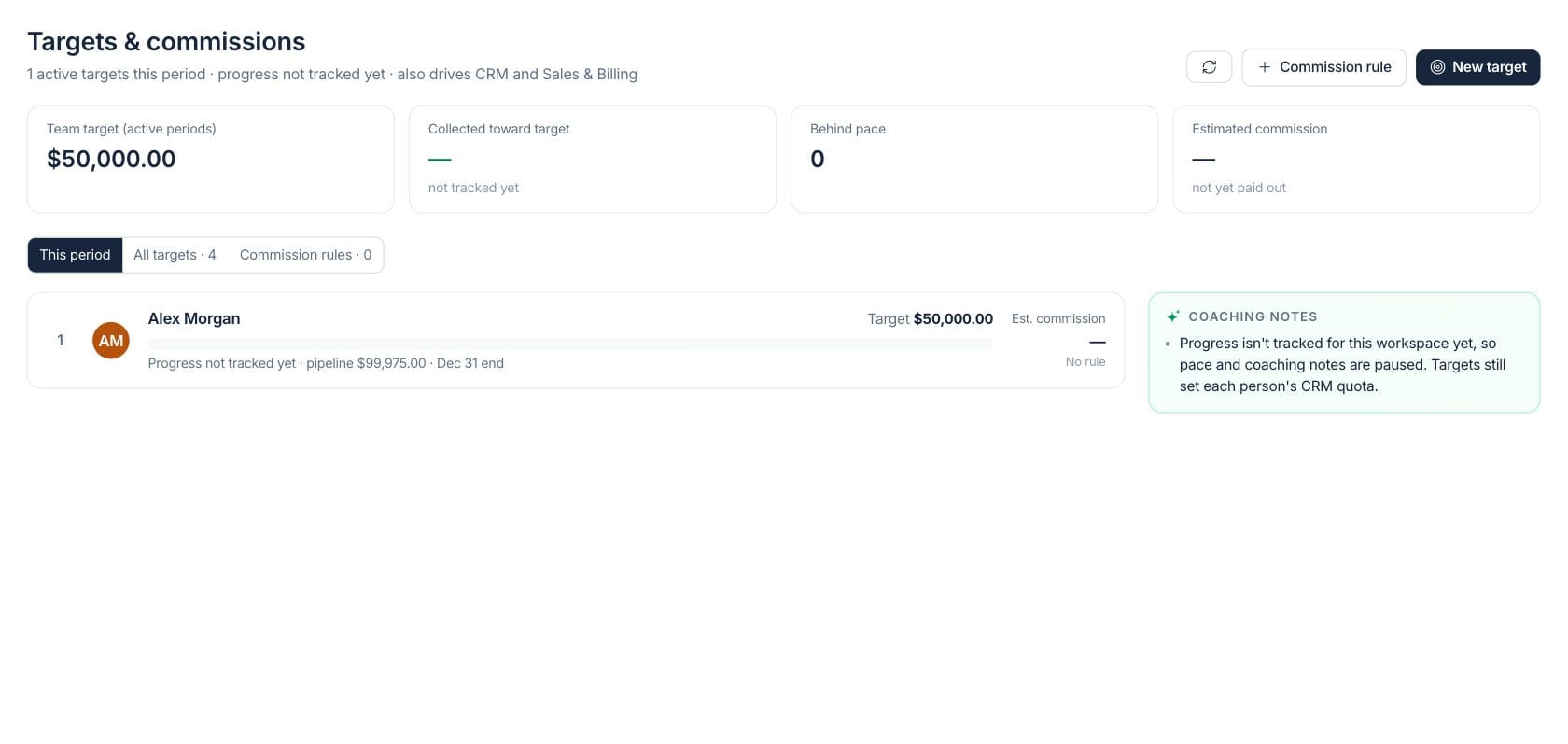
At a glance
The numbers on your screen, explained
What each Targets & Commissions number means and where it comes from — so you know where to act.
Active sales targets for the current period are summed for viewers who can see target amounts.
When attainment tracking is available, collected sales credited to active targets are totaled.
People are counted when tracked attainment is materially behind the expected pace for their period.
Estimated commission is calculated from active commission rules and tracked collections; it is not a payroll payout.
Sample numbers from a demo workspace.
Targets
Set a quota for each person and period
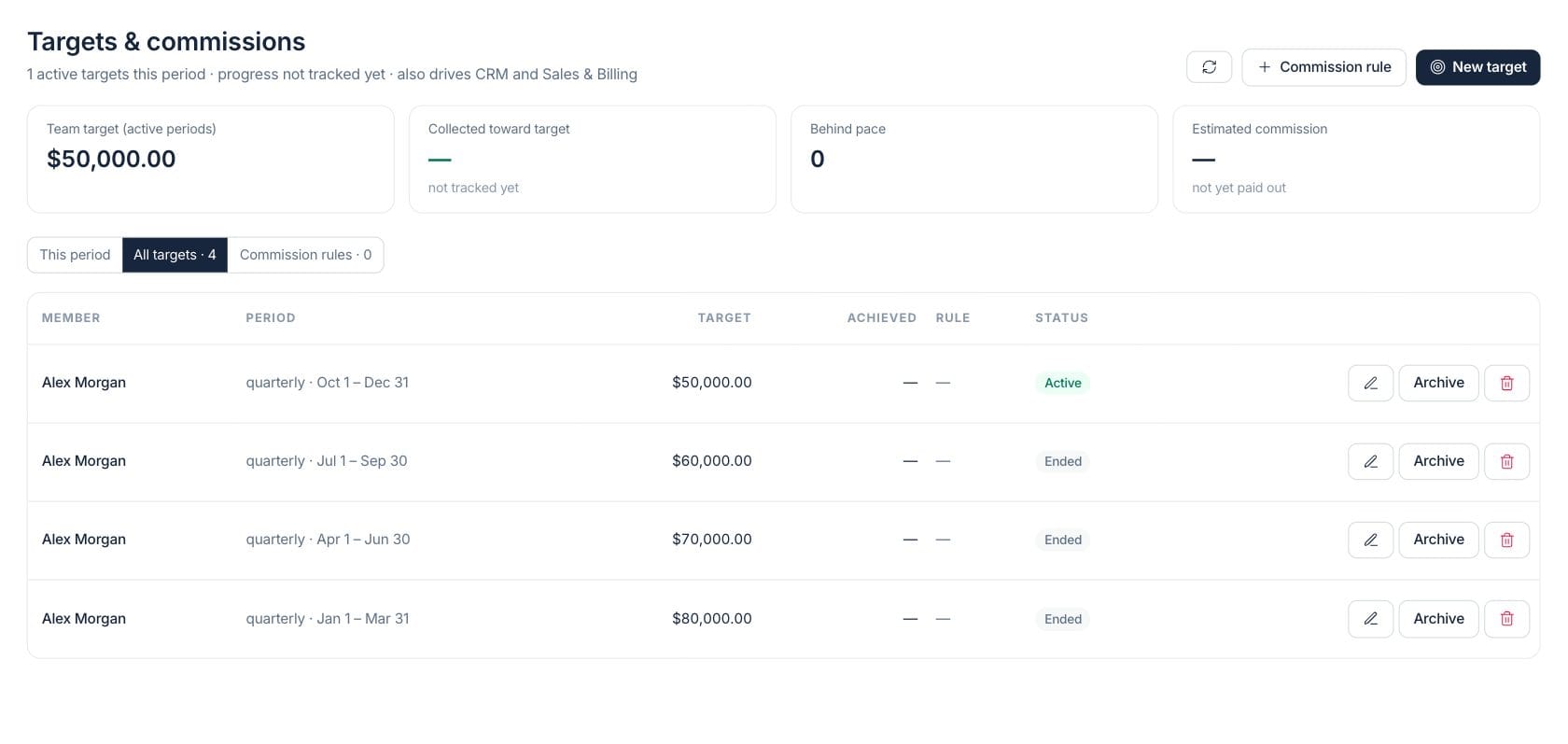
Create monthly, quarterly, or yearly targets for team members. The target also feeds CRM and Sales & Billing quota context, so leaders can review goals in one place.
- Target amount, member, period, start, and end date
- Active, scheduled, ended, and archived target states
- Role-based visibility for target and attainment amounts
Progress
Review pace only when attainment data is available
When tracking is available, the workspace shows collected progress, expected pace, end-of-period projection, and pipeline cover. If tracking is not available, progress clearly shows as not tracked.
- Progress bars compare achieved and expected pace
- Behind-pace count highlights coaching needs
- Pipeline cover uses CRM context for visible gaps
Commission
Estimate commission from clear rule definitions
Attach percentage, flat, or tiered commission rules to targets. The page calculates estimated commission for review but does not run payroll payouts.
- Percentage, flat-rate, and tiered rule types
- Estimated commission shown beside each person
- Rules can be managed separately from targets
Everything included
Everything in Targets & Commissions
Use it for individual goals, team targets, territory plans, and commission preparation.
Per-person quotas
Set a target amount for each team member and period.
Period control
Use monthly, quarterly, or yearly periods with explicit start and end dates.
Leaderboard view
Review the current-period board with progress, rank, and target context when tracked.
Pace and projection
Compare actual collections to expected pace and see projected finish when data is available.
Commission rules
Define percentage, flat, or tiered rules and attach them to targets.
Estimated commission
Estimate commission for review while clearly marking that it has not been paid out.
Pipeline cover
Use CRM pipeline value to understand whether gaps may be covered by open opportunities.
Access controls
Respect viewer permissions for target amounts, attainment, and commission definitions.
How it works
Targets & Commissions, step by step
- 01
Create targets for the period
Pick the team member, period, dates, and quota amount that should guide the current sales cycle.
- 02
Attach commission rules
Add a percentage, flat, or tiered rule when the target needs estimated commission context.
- 03
Review progress carefully
Use collected progress, pace, projection, and pipeline cover only when attainment tracking is available.
- 04
Coach and adjust
Archive old targets, activate future ones, and use behind-pace notes to guide sales coaching.
Connected
Works with the rest of Fratelli
The same records flow between these workspaces automatically.
FAQ
Targets & Commissions questions
Can’t find what you need? Our team is happy to help.
No. The workspace estimates commission from configured rules for review. It does not run payroll or pay commissions.
The page shows target definitions but marks progress and estimated commission as not tracked, instead of implying a false zero.
Yes. Targets are assigned to individual team members for a defined monthly, quarterly, or yearly period.
Try Targets & Commissions with the rest of Fratelli
Start free in minutes and bring the rest of your team when you are ready.