

Service & Repairs
Run service, repair, installation, and maintenance work from intake through scheduling, technician assignment, parts, labor, invoice handoff, and service plans.
At a glance
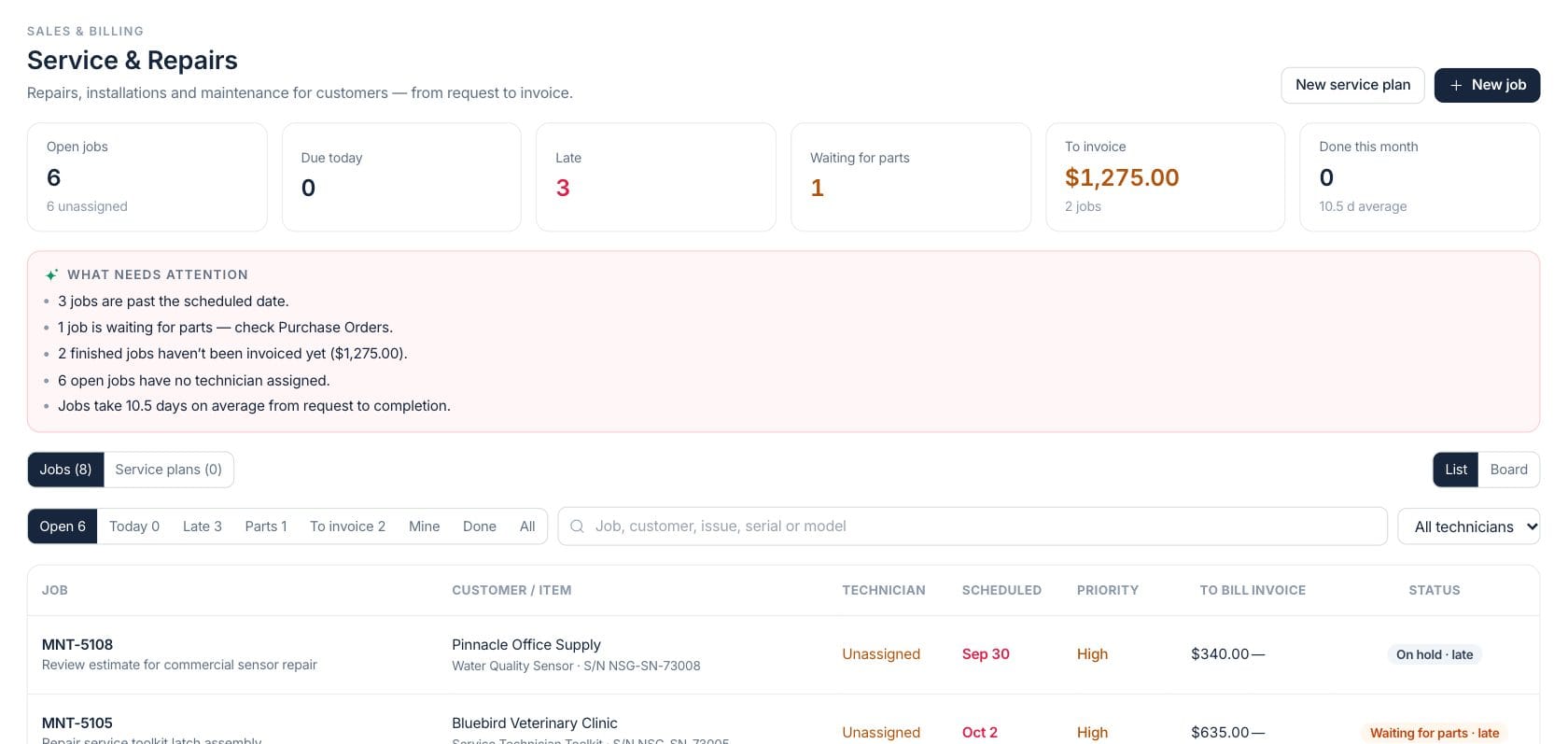
The numbers on your screen, explained
What each Service & Repairs number means and where it comes from — so you know where to act.
Jobs that are not completed, cancelled, or closed are counted, with the hint showing how many lack a technician.
Open jobs scheduled for today are counted so dispatch can focus on the current day.
Open jobs past their scheduled date are counted and shown in the late view.
Completed billable labor, parts, and fees that have not been invoiced are totaled.
Sample numbers from a demo workspace.
Dispatch
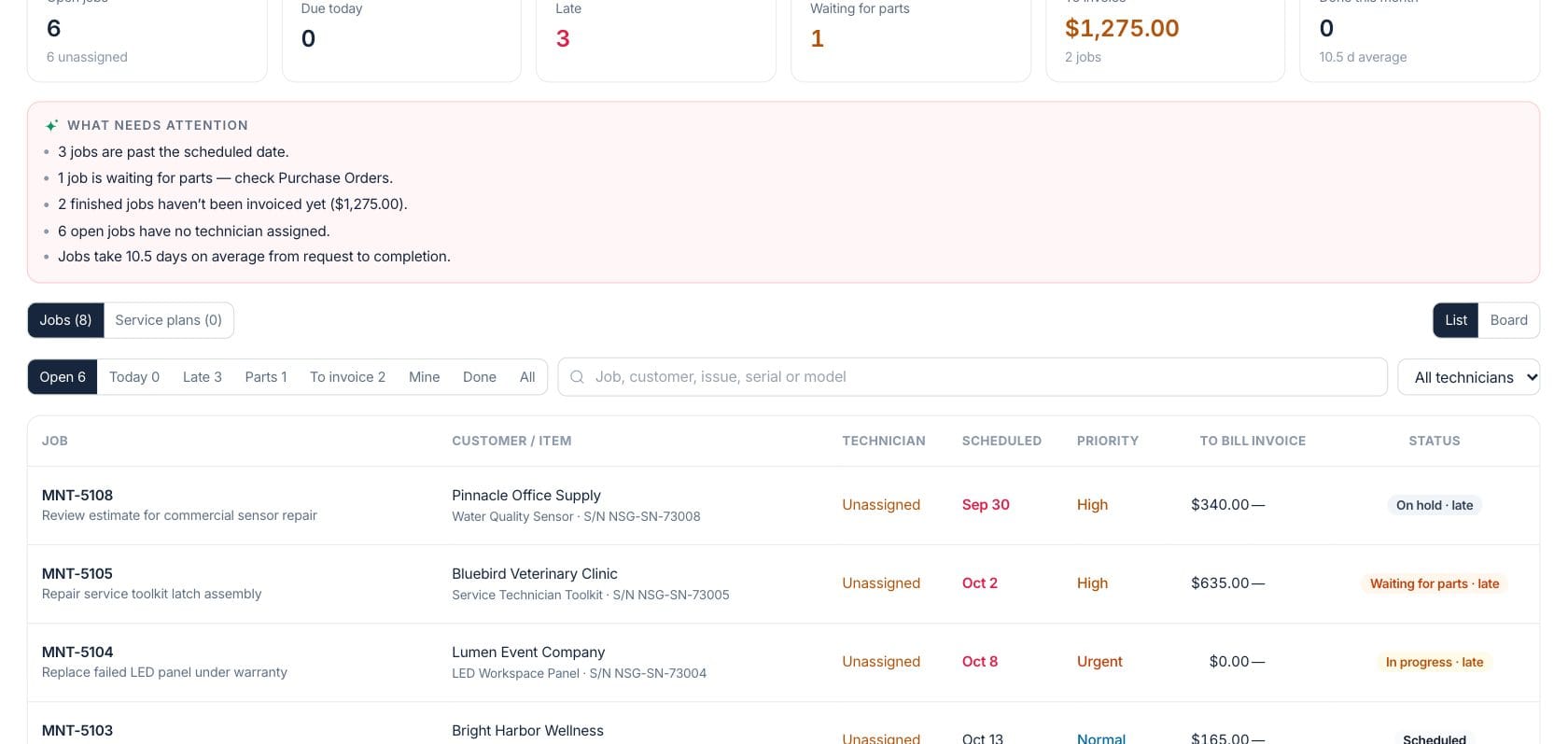
Track every job by customer, item, technician, and status
The service workspace lists open work with customer, equipment, technician, scheduled date, priority, billable amount, invoice status, and lifecycle stage.
- List and board layouts for jobs
- Smart views for open, today, late, parts, to invoice, mine, done, and all
- Technician filter and workload chips
Work order
Capture parts, labor, warranty, and next-step decisions
Each job can store the issue, priority, source, technicians, product or equipment, parts used, labor entries, warranty coverage, and findings before it moves forward.
- Canonical lifecycle actions guide valid status moves
- Parts and labor roll into billable totals
- Warranty coverage can reduce the customer charge
Bill
Create an invoice from finished service work
When a job is ready to bill, the workspace builds invoice lines from billable labor, parts, service fees, and warranty offsets, then links the invoice back to the job.
- To-invoice view groups completed unbilled work
- Invoice lines use labor hours, part sell price, and fees
- Linked invoice keeps service and billing history together
Plans
Schedule recurring maintenance visits
Service plans track recurring work for customer equipment. Completing a job can advance the plan to its next visit date so maintenance does not rely on memory.
- Service plan tab for recurring schedules
- Next due date and recurrence settings
- Completed jobs can move the plan forward
Everything included
Everything in Service & Repairs
Use it for repair shops, field service visits, installations, warranty work and recurring service plans.
Service jobs
Create repair, installation, maintenance, and warranty jobs for customers and equipment.
Scheduling
Track scheduled dates, due-today work, late jobs, and recurring service plans.
Technician assignment
Assign technicians, filter by technician, and see unassigned jobs that need dispatch.
Parts tracking
Record parts used on a job and highlight work waiting for parts.
Labor entries
Capture technician time, billable hours, hourly rates, and job findings.
Warranty handling
Track warranty status and covered amounts that reduce what the customer owes.
Invoice handoff
Create invoice lines from parts, labor, fees, and warranty offsets for completed work.
Lifecycle controls
Move jobs through valid next steps with the same lifecycle used by server and mobile workflows.
Attention notes
See late jobs, waiting parts, unassigned work, unbilled jobs, and average turnaround notes.
How it works
Service & Repairs, step by step
- 01
Log the service request
Record the customer, equipment or item, issue, source, priority, and desired schedule.
- 02
Assign and work the job
Move the job through valid stages while technicians add labor, findings, parts, and warranty details.
- 03
Review what needs attention
Use late, parts, unassigned, and to-invoice views to keep work from falling through the cracks.
- 04
Invoice or advance the plan
Create the customer invoice for billable work, then update any recurring service plan to its next visit.
Connected
Works with the rest of Fratelli
The same records flow between these workspaces automatically.
FAQ
Service & Repairs questions
Can’t find what you need? Our team is happy to help.
Yes. Jobs can include parts, labor entries, service fees, and warranty-covered amounts, which are used when creating invoice lines.
Yes. The Service plans tab manages recurring schedules, and completing a linked job can move the plan to its next due date.
No. The workspace uses a defined lifecycle and only allows valid next steps, so job status changes stay consistent.
Try Service & Repairs with the rest of Fratelli
Start free in minutes and bring the rest of your team when you are ready.