

Recurring Billing
Turn ongoing service agreements, memberships, and retainers into repeatable billing schedules with clear next invoice dates, collection settings, and payment health.
At a glance
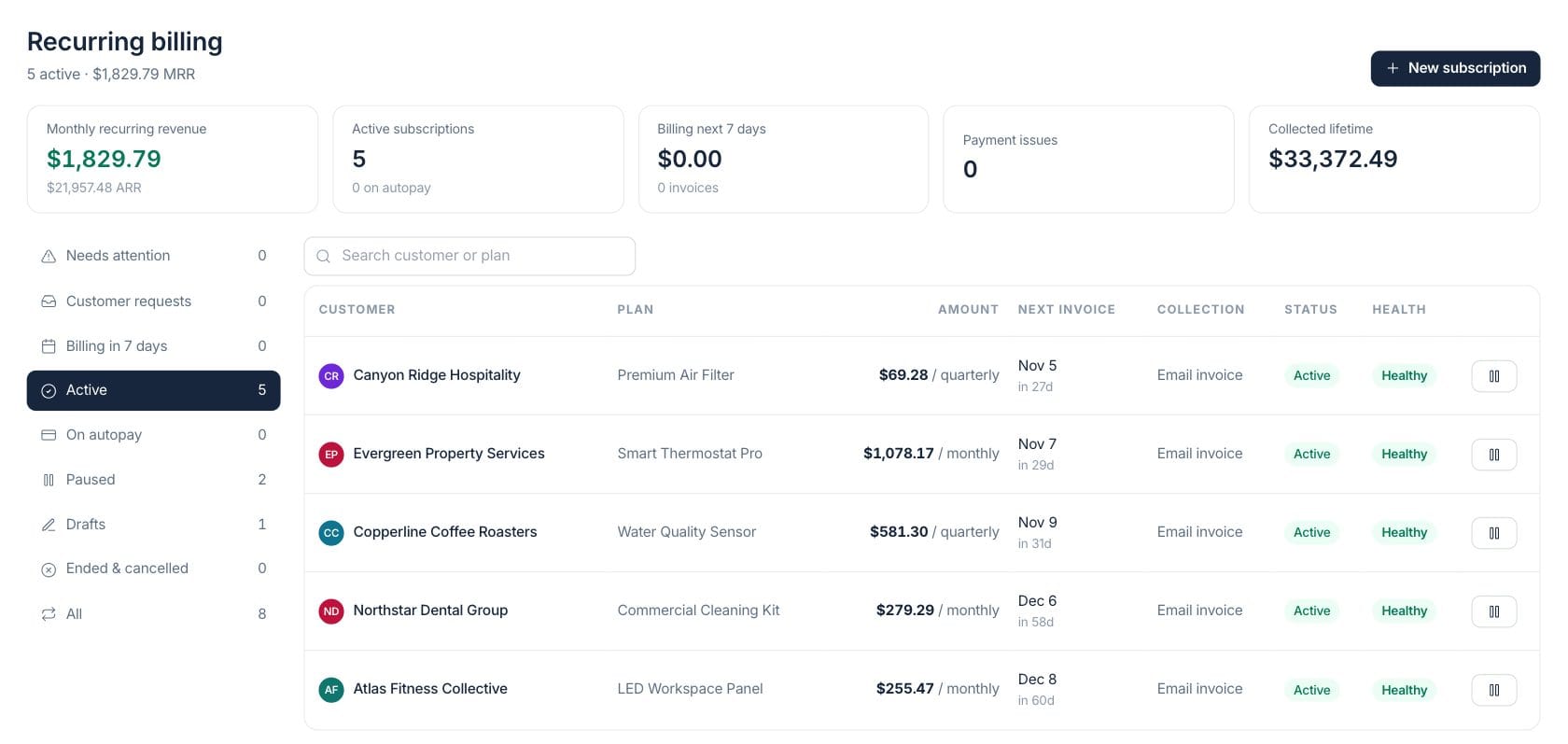
The numbers on your screen, explained
What each Recurring Billing number means and where it comes from — so you know where to act.
Active billing profiles are converted to a monthly value from their invoice template and cadence.
Profiles with an active status are counted, with the hint showing how many are enrolled for automatic card collection.
Upcoming active profiles due in the next week are summed from their scheduled invoice amount.
Subscriptions are flagged when autopay, customer action, or recent billing-run signals show collection risk.
Sample numbers from a demo workspace.
Schedule
Build repeat billing once, then review every upcoming invoice
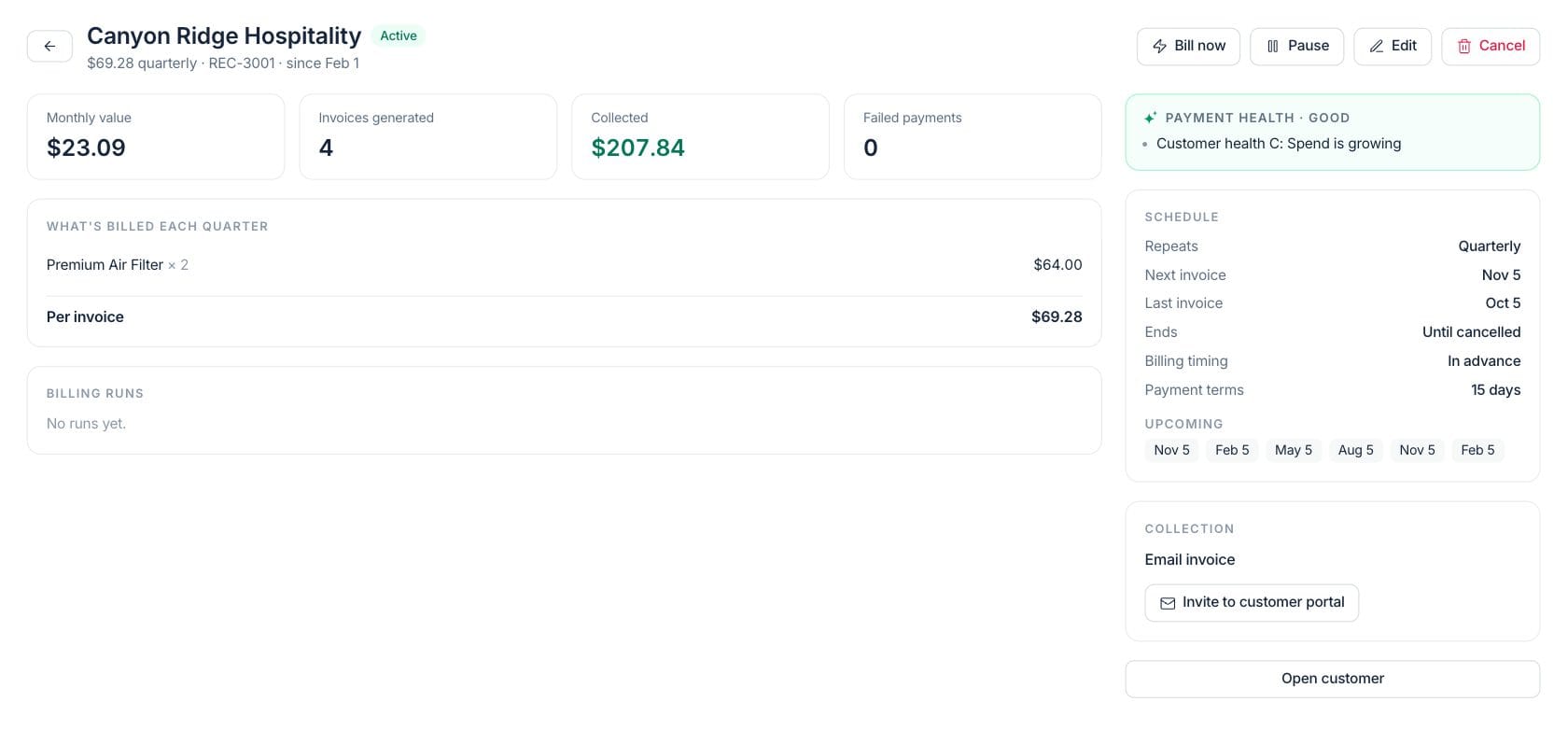
Set the cadence, terms, next invoice date, and invoice contents for each recurring agreement. The detail view keeps the customer, amount, schedule, and upcoming dates visible together.
- Monthly, quarterly, yearly, or custom cadence
- Reusable invoice lines, terms, and delivery settings
- Pause, resume, edit, cancel, or bill now from the profile
Template
Keep the invoice template tied to the agreement
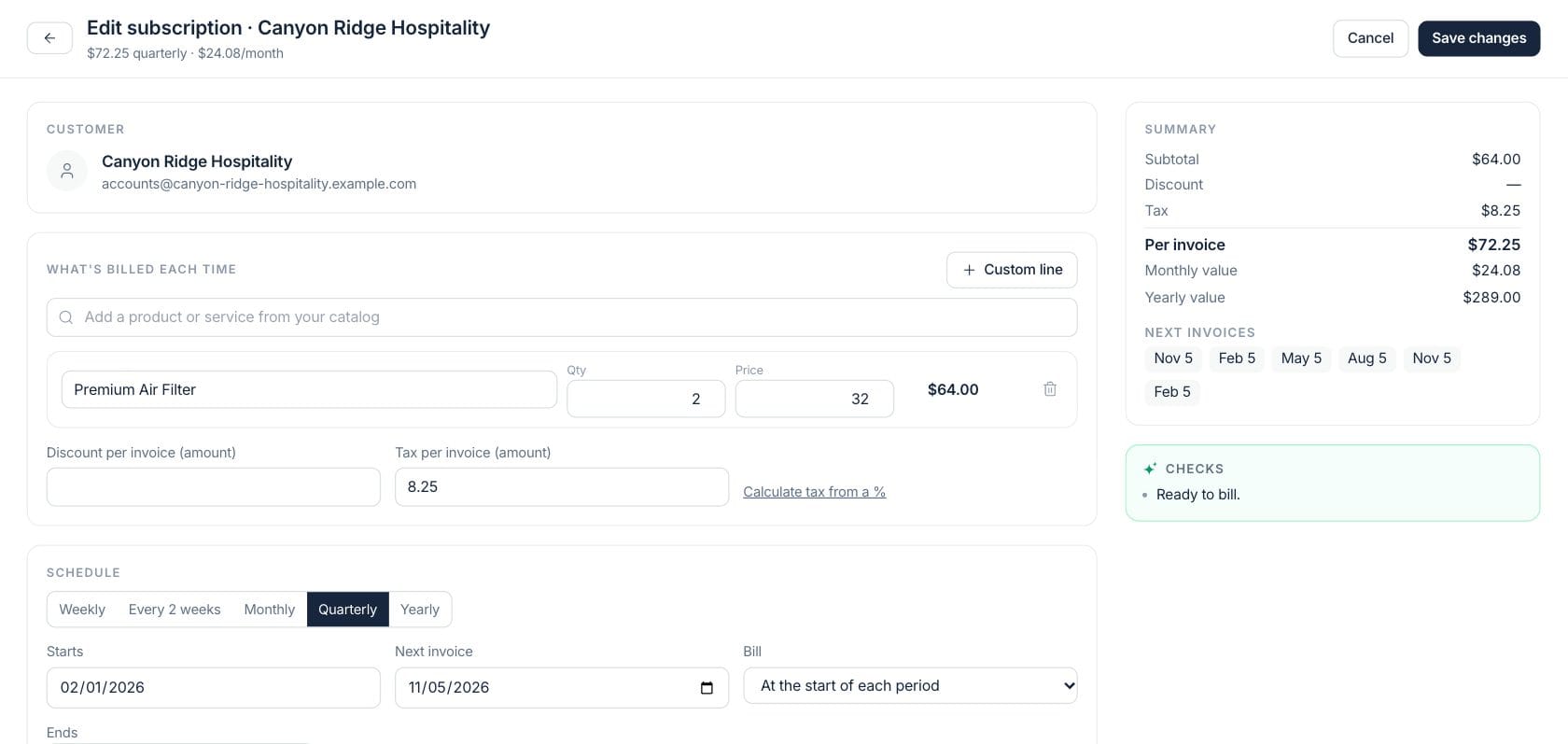
The setup screen stores the line items, discounts, taxes, and terms that will be used when the next invoice is generated, so billing stays consistent across cycles.
- Product and service lines stay attached to the schedule
- Billing timing and payment terms are stored with the profile
- Invoice totals are calculated from the same invoice engine
Collect
Watch payment health before recurring revenue slips
Recurring billing highlights failed payments, missing autopay enrollment, customer action needed, and customer requests so your team can follow up before the next cycle.
- Needs-attention view for payment risk
- Customer request inbox for pauses, changes, and recovery
- Portal invite and recovery-link actions from the profile
Everything included
Everything in Recurring Billing
Use it for retainers, memberships, subscriptions, and recurring service agreements.
Repeat schedules
Create ongoing billing profiles with cadence, next invoice date, end date, and billing timing.
Reusable invoice content
Store the products, quantities, discounts, terms, and totals that each future invoice should use.
Autopay context
Track whether a customer is enrolled for card collection and whether the last attempt needs attention.
Pause and resume
Stop future invoices while paused, then resume with a chosen next invoice date.
Customer requests
Review requests for billing changes and resolve them without losing the agreement history.
Payment health
See clear risk reasons for failed payments, retries, missing enrollment, or stale schedules.
Portal invites
Send an invite or recovery link so customers can help complete the billing setup.
Run history
Review generated invoices, billing runs, and collection activity for each recurring profile.
How it works
Recurring Billing, step by step
- 01
Choose the customer and cadence
Create a recurring profile for the customer, then set how often the agreement should bill and when the next invoice is due.
- 02
Attach the invoice template
Add the products, services, terms, taxes, and delivery settings that should be reused each cycle.
- 03
Monitor upcoming billing
Use the billing-next-7-days and needs-attention views to prepare invoices and follow up on payment issues.
- 04
Pause, resume, or bill now
Adjust the lifecycle when work changes, or generate the next bill from the profile when you are ready.
Connected
Works with the rest of Fratelli
The same records flow between these workspaces automatically.
FAQ
Recurring Billing questions
Can’t find what you need? Our team is happy to help.
No. Each profile stores its collection method. Some agreements are email-invoice only, while autopay profiles show enrollment and payment-health details when card collection is set up.
Yes. Pausing stops new invoices from being created while existing invoices remain as they are. Resuming lets you choose the next invoice date.
Yes. The workspace includes a customer-request inbox for billing changes, payment recovery, and related subscription follow-up.
Try Recurring Billing with the rest of Fratelli
Start free in minutes and bring the rest of your team when you are ready.