

Customer Insights
Understand how each customer buys and pays, who is at risk, who is ready to reorder, and which conversations should happen next.
At a glance
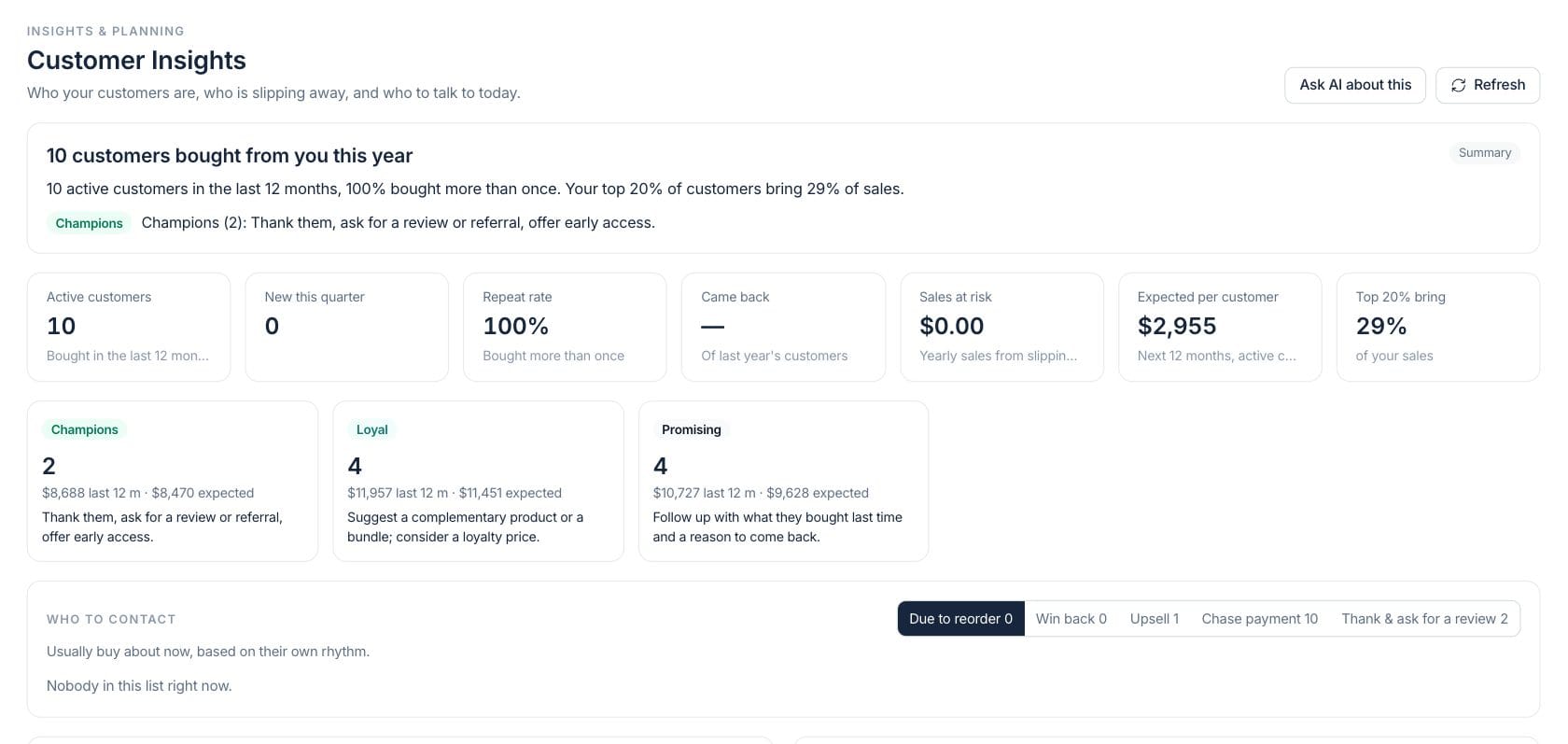
The numbers on your screen, explained
What each Customer Insights number means and where it comes from — so you know where to act.
Active customers count accounts that bought in the last 12 months.
Repeat rate is the share of customers who have purchased more than once.
Sales at risk is yearly sales from customers whose buying rhythm suggests they may be slipping away.
Top 20% bring shows the share of sales generated by the highest-value customers.
Sample numbers from a demo workspace.
Segments
Group customers by buying rhythm, value, and risk
Customer Insights segments accounts into groups such as champions, loyal, new, promising, attention, at risk, can’t lose, hibernating, and one-time customers.
- Segment cards show count, last-12-month value, expected value, and movement
- Filter the full table by segment, value, risk, or recency
- Open customer details from the insight table
Contact list
Know who to contact and why
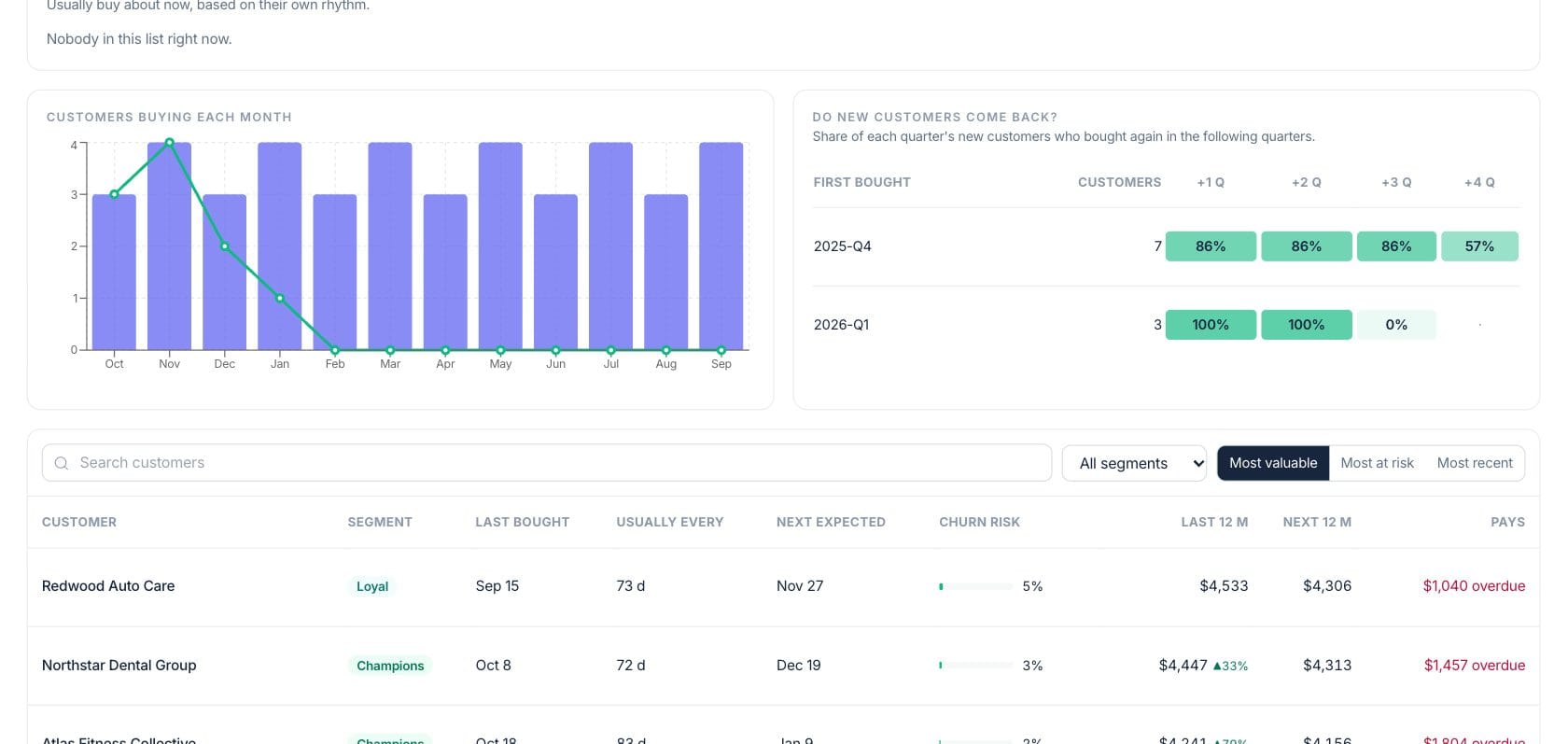
Ready-to-act lists show customers due to reorder, win-back targets, upsell suggestions, overdue payment follow-up, and champions to thank or ask for a review.
- Each list explains the reason behind the recommendation
- Draft reorder, win-back, upsell, and thank-you emails for review
- Open invoices for overdue payment follow-up
Retention
Track customer activity and cohort return rates
Charts show customers buying each month and whether new customers came back in following quarters, giving a simple view of retention quality.
- Monthly chart compares active and new customers
- Cohort table shows return rate after one to four quarters
- Customer table includes next expected purchase and churn risk
Everything included
Everything in Customer Insights
Use it for segmentation, retention review, account planning, and campaign preparation.
Customer segments
Segment accounts by value, recency, repeat behavior, and relationship risk.
Buying rhythm
Estimate when each customer is likely due to buy again based on past activity.
Champion tracking
Identify strong customers worth thanking, nurturing, or asking for reviews.
Win-back lists
Find valuable customers who are late relative to their normal purchase cycle.
Upsell suggestions
Suggest related products that similar customers already buy.
Email drafts
Draft customer emails for review before sending through the sales tools.
Payment behavior
See overdue amounts and whether customers tend to pay late.
Retention cohorts
Review whether new customers return in later quarters.
How it works
Customer Insights, step by step
- 01
Scan the KPI row
Check active customers, repeat rate, retention, sales at risk, expected value, and concentration.
- 02
Choose an action list
Pick due to reorder, win back, upsell, chase payment, or thank and review.
- 03
Open a customer or draft an email
Review the reason, open the source customer, or draft the suggested email before sending.
- 04
Review retention health
Use monthly activity, cohort return rates, and churn risk to plan campaigns and account work.
Connected
Works with the rest of Fratelli
The same records flow between these workspaces automatically.
FAQ
Customer Insights questions
Can’t find what you need? Our team is happy to help.
The workspace drafts emails for review. You can inspect and edit the message before sending through the connected sales email flow.
Segments are calculated from each customer’s value, buying rhythm, recency, repeat behavior, expected value, and relationship risk.
Yes. The customer table and payment follow-up list include overdue amounts and late-payment context when invoices are available.
Try Customer Insights with the rest of Fratelli
Start free in minutes and bring the rest of your team when you are ready.