

Loyalty & Rewards
Define reward programs, tiers, point rules, member balances, and credit value so repeat-customer benefits stay easy to explain.
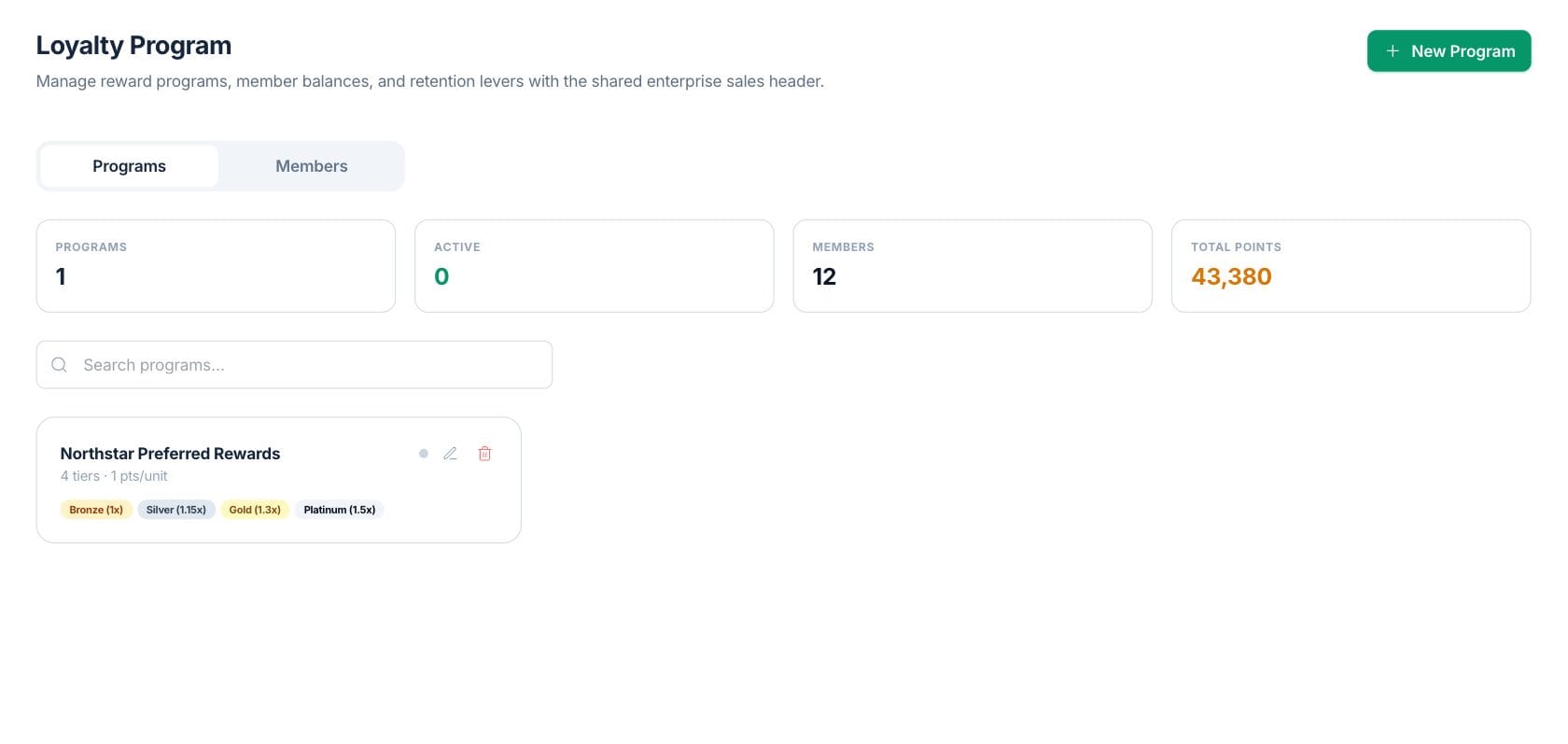
At a glance
The numbers on your screen, explained
What each Loyalty & Rewards number means and where it comes from — so you know where to act.
Total loyalty programs saved in the workspace.
Client loyalty records currently tracked as members.
Reward points customers redeemed during the current month.
Repeat customer visits or orders tied to loyalty members this month.
Sample numbers from a demo workspace.
Design
Create point rules and tier multipliers
Programs define points per currency unit, redemption rate, and tier thresholds so staff can explain how customers earn and redeem rewards.
- Set bronze, silver, gold, and platinum tiers
- Configure tier multipliers and minimum points
- Add perks that describe each tier
Track
Review member points, tiers, and credit balance
The Members tab shows each client, current tier, current points, lifetime points, and credit balance for customer-service and retention work.
- Search members by customer name
- Compare current and lifetime points
- View customer credit balance
Maintain
Manage programs without losing visibility
The program list shows active status, tier count, earning rate, and tier chips so program setup can be reviewed quickly.
- Create, edit, or delete loyalty programs
- See active status at a glance
- Open program detail from the list
Everything included
Everything in Loyalty & Rewards
Use it for points, member tiers, purchase rewards and retention.
Reward programs
Create programs with earning rates, redemption value, and active status.
Membership tiers
Define bronze, silver, gold, and platinum tiers with thresholds and multipliers.
Member list
Track enrolled customers with their current tier and balances.
Points balances
Show current and lifetime points for each member.
Credit balance
Review the credit value tied to each loyalty member.
Search
Search programs or members from the loyalty page.
Redemption rate
Set how points translate into redeemable value.
How it works
Loyalty & Rewards, step by step
- 01
Create the program
Name the program and set whether it should be active.
- 02
Configure earning and redemption
Set points per currency unit, redemption rate, tiers, multipliers, and perks.
- 03
Track members
Review each member’s tier, current points, lifetime points, and credit balance.
- 04
Adjust the program over time
Edit tier thresholds or perks as the retention program changes.
Connected
Works with the rest of Fratelli
The same records flow between these workspaces automatically.
FAQ
Loyalty & Rewards questions
Can’t find what you need? Our team is happy to help.
Yes. The page supports bronze, silver, gold, and platinum tiers with minimum points, multipliers, and perks.
Yes. The Members tab shows current points, lifetime points, tier, and credit balance by client.
Yes. The KPI card sums current member point balances from client loyalty records.
Try Loyalty & Rewards with the rest of Fratelli
Start free in minutes and bring the rest of your team when you are ready.