

Checks Register
Record received and issued checks, track their lifecycle and keep invoice, bill and bank context attached.
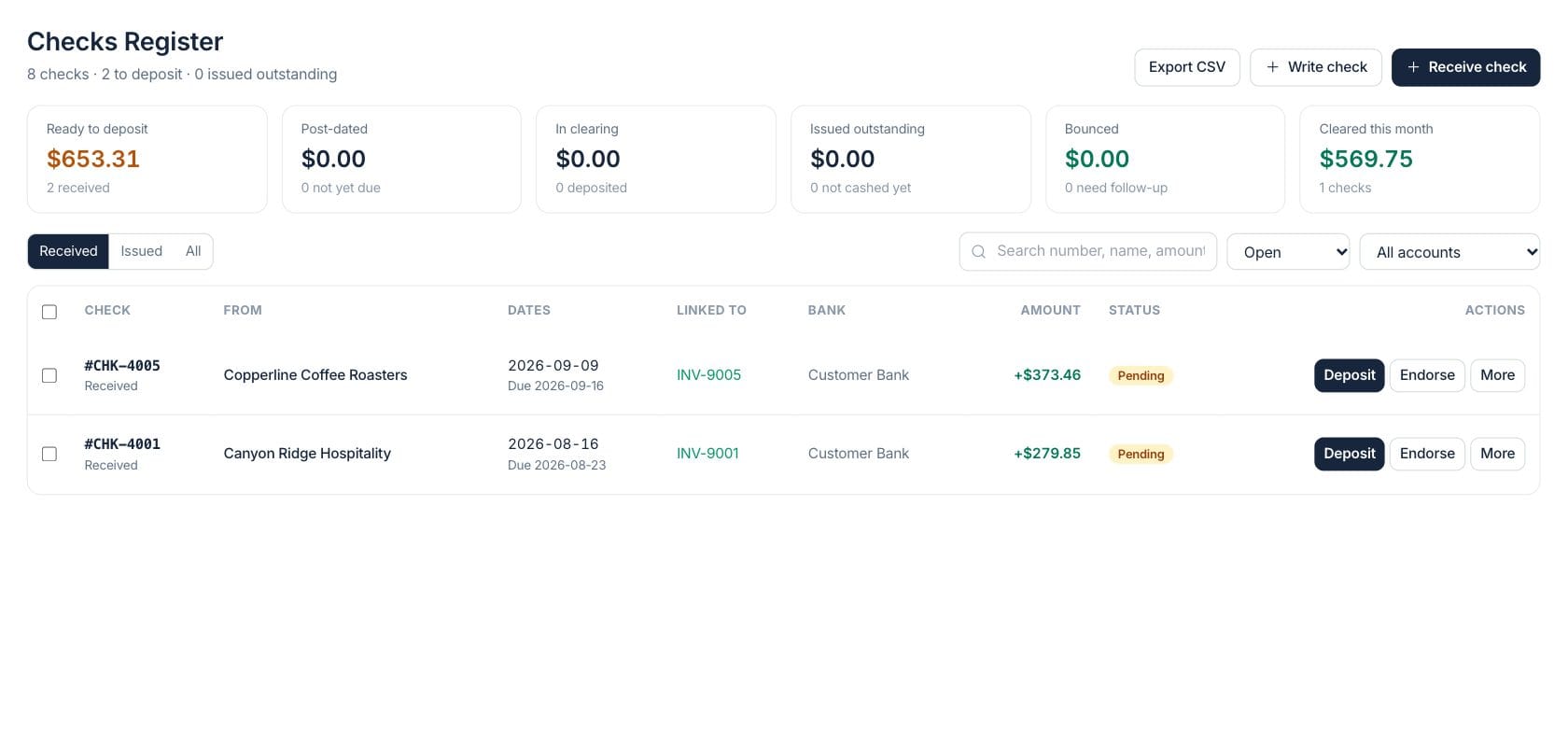
At a glance
The numbers on your screen, explained
What each Checks Register number means and where it comes from — so you know where to act.
Received checks whose due date has arrived and are still waiting to be deposited.
Received checks marked deposited but not yet cleared or bounced.
Outgoing checks that have been issued and are still pending bank clearing.
The value of received and issued checks marked cleared during the current month.
Sample numbers from a demo workspace.
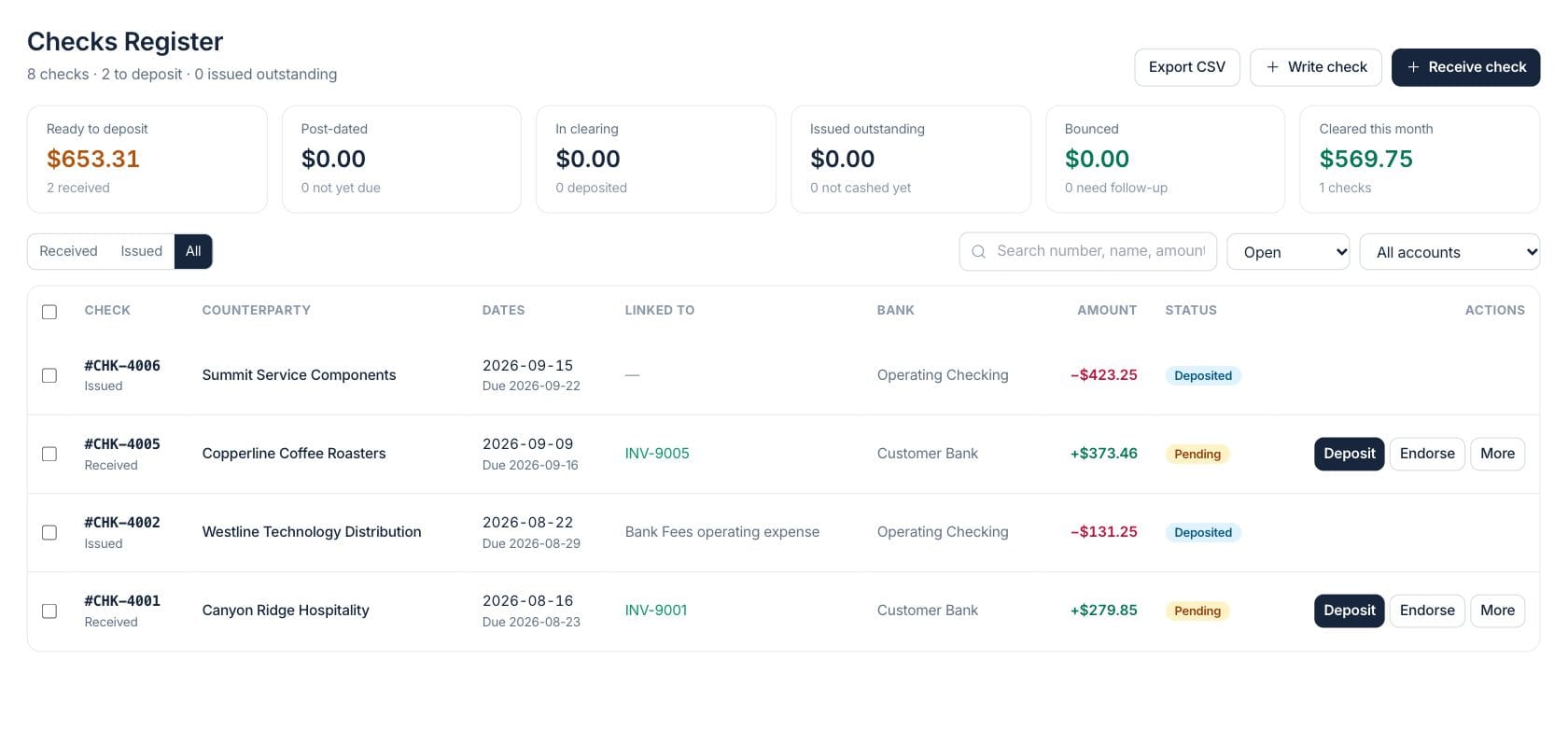
Register
See received and issued checks in one list
The register keeps check number, counterparty, dates, linked invoice or expense, bank account, amount and status visible for every check.
- Filter by received, issued or all checks
- Search number, name or amount
- Export the current check list to CSV
Lifecycle
Move each check through the right status
Received checks follow pending, deposited, cleared, bounced, endorsed or cancelled paths. Issued checks can be cleared, voided or bounced.
- Deposit selected received checks in bulk
- Print checks or deposit slips where supported
- Track bounce reasons, fees and lifecycle history
Links
Keep invoice and expense context close
Checks can link to invoices or expenses, and clearing a received check offers a one-click invoice payment record when a balance remains.
- Open the linked invoice from the row or detail drawer
- Record invoice payment after a received check clears
- Use next check numbers for outgoing checks
Everything included
Everything in Checks Register
Use it for vendor payments, manual disbursements, and check reconciliation support.
Received checks
Record customer checks with drawer, bank, due date, linked invoice and notes.
Issued checks
Write supplier or expense checks and track whether they are pending, cleared, void or bounced.
Print support
Print outgoing checks and deposit slips from selected register rows.
Bulk deposit
Select multiple received checks, mark them deposited and print a slip together.
Source links
Connect checks to invoices or expenses so follow-up starts from the right document.
Lifecycle history
Keep a dated history of status transitions such as deposit, clearance, bounce and endorsement.
CSV export
Export visible register rows with direction, number, status, counterparty, bank and amount.
How it works
Checks Register, step by step
- 01
Record or write the check
Create an incoming check from a customer or an outgoing check for a supplier, bank account or expense.
- 02
Track dates and status
Use due dates, deposit dates, cleared dates and status filters to see what still needs action.
- 03
Connect the source record
Link checks to invoices or expenses so finance can open the related record from the register.
- 04
Clear or follow up
Mark checks cleared, bounced, endorsed, cancelled or voided and preserve the lifecycle history.
Connected
Works with the rest of Fratelli
The same records flow between these workspaces automatically.
FAQ
Checks Register questions
Can’t find what you need? Our team is happy to help.
No. The app offers to record the payment, but the user explicitly confirms that invoice payment entry.
Yes. Outgoing checks can be printed from the row actions or detail drawer when they are eligible.
Try Checks Register with the rest of Fratelli
Start free in minutes and bring the rest of your team when you are ready.